Self-host n8n with Docker: automation without the Zapier bill
Published 2026-10-07 · tested on Ubuntu 24.04, Intel Core Ultra 7 255H, Docker 29
TESTED — we actually deployed this
n8n is the self-hosted Zapier alternative: visual workflow automation with 400+ integrations, except the per-task pricing is replaced by your own hardware. Zapier’s free tier caps you at 100 tasks/month; a self-hosted n8n runs unlimited workflows for the cost of ~450 MB of RAM.
We deployed the current version (2.x), hit two real problems worth knowing about, and built a first workflow that’s actually useful. All numbers measured on our hardware.
What you need
- Docker on any machine with 1 GB+ free RAM — n8n settled at 442 MB in our tests, roughly 3x heavier than lightweight self-hosted apps like Uptime Kuma
- ~1 GB disk (image is 259 MB + your workflow data)
- 15 minutes
Step 1: the Compose file
services:
  n8n:
    image: docker.n8n.io/n8nio/n8n:latest
    container_name: n8n
    ports:
      - "5678:5678"
    environment:
      - N8N_SECURE_COOKIE=false
      - GENERIC_TIMEZONE=Asia/Kolkata
      - TZ=Asia/Kolkata
      - N8N_RUNNERS_ENABLED=true
    volumes:
      - n8n-data:/home/node/.n8n
    restart: unless-stopped

volumes:
  n8n-data:
Line-by-line of the non-obvious parts:
N8N_SECURE_COOKIE=false— required when accessing over plain HTTP (localhost or LAN IP). Without it, login silently fails because the auth cookie demands HTTPS. Remove this once you put a reverse proxy with TLS in front.GENERIC_TIMEZONE— schedule triggers fire in this timezone. Forget it and your “9am daily” workflow runs at UTC 9am (2:30pm IST).N8N_RUNNERS_ENABLED=true— opts into the task-runner architecture early; older execution mode is deprecated.
docker compose up -dOpen http://localhost:5678, create the owner account (local — nothing is sent to n8n cloud), and skip the license-key promo if you don’t want it.
Step 2: a first workflow that’s actually useful
Most n8n tutorials end with a hello-world HTTP call. Here’s one that solves a real problem: free database tiers pause when idle. Supabase pauses after 7 days of inactivity. A scheduled n8n workflow keeps it alive:
- Schedule Trigger node → every 3 days
- Postgres node → your database credentials → query:
SELECT 1 AS keepalive; - Publish (n8n 2.x renamed “Activate” — workflows now ship as published versions)
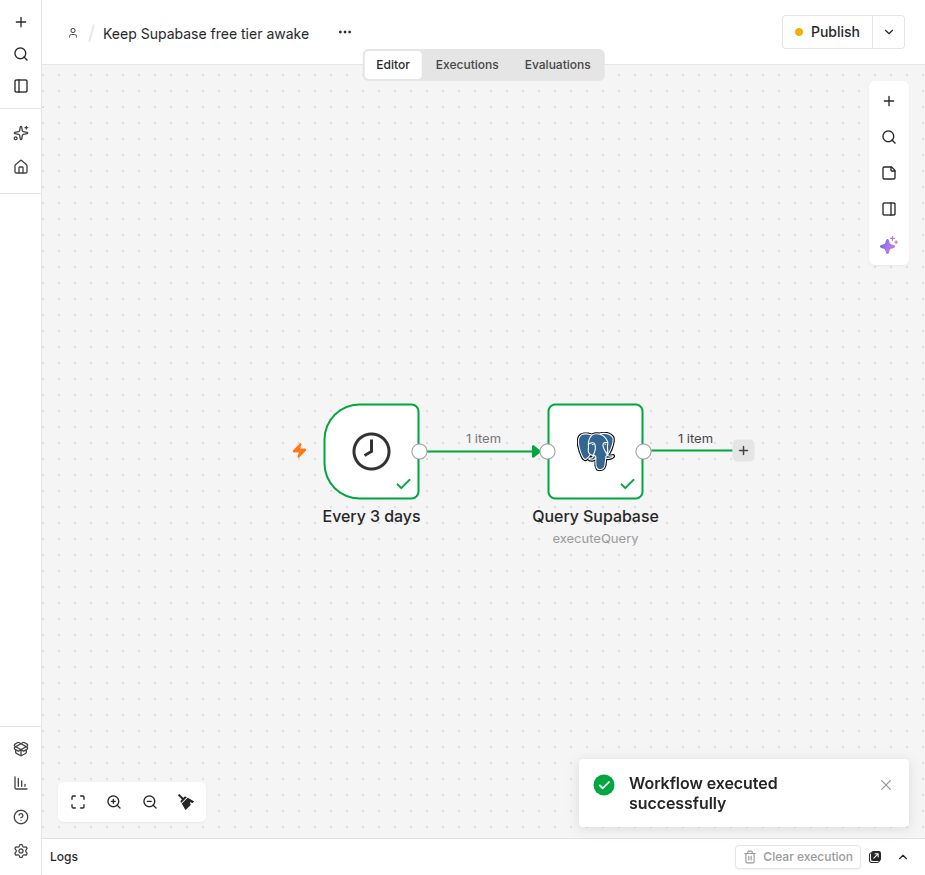
That’s a real cron job with a UI, execution history, and failure visibility — the thing you’d otherwise write as a crontab line and forget about until it silently breaks.
The two snags we actually hit
1. “self-signed certificate in certificate chain” — our first Postgres connection to Supabase’s pooler failed with this TLS error. n8n’s Postgres node verifies the full certificate chain by default, and many managed poolers (Supabase included) present chains that fail strict verification. Fix: in the Postgres credential, enable “Ignore SSL Issues” (or supply the provider’s CA cert if you want strict verification — the right call for production).
2. The publish model confuses old tutorials. n8n 2.x replaced the simple active/inactive toggle with a publish flow — you publish a named version of the workflow. Tutorials showing an “Active” toggle in the header are describing 1.x. Same concept, different button.
What it costs to run (measured)
| Metric | Measured value |
|---|---|
| Image size | 259 MB |
| RAM at boot | 652 MB |
| RAM settled (1 active workflow) | 442 MB |
| CPU idle | ~0.5% of one core |
| Data volume (2 workflows, SQLite) | 5.7 MB |
| Restart to ready | 3 s |
RAM is the real cost: at ~450 MB settled, n8n wants a machine with headroom. It runs on a 1 GB VPS but it’s tight once workflows do real work. 2 GB is comfortable.
Gotchas
- Default database is SQLite — fine for personal use up to dozens of workflows. Heavy parallel executions want the Postgres backend (set
DB_TYPE=postgresdb+ connection env vars). - Webhooks need a public URL. Schedule-triggered workflows work fine on a LAN, but anything triggered by external services (GitHub webhooks, Telegram bots) needs the instance reachable from the internet — reverse proxy + TLS, or a Tailscale funnel.
- Community vs paid features: the core editor and all 400+ nodes are free (fair-code license). Collaboration features, SSO, and environments are paid. n8n offers a free “registered community” tier that unlocks debugging and folders in exchange for an email.
- Backups: everything lives in the
n8n-datavolume. Same pattern as any Docker app:
docker run --rm -v n8n-data:/data -v "$PWD":/backup alpine \
  tar czf /backup/n8n-backup-$(date +%F).tar.gz -C /data .
When NOT to self-host n8n
- Your machine isn’t always on. A schedule trigger on a sleeping laptop doesn’t fire. Scheduled workflows are exactly the workload that needs an always-on host — a free Oracle VM or any ~$5/month VPS fits n8n’s footprint.
- You need 2-3 simple zaps and nothing else. Zapier/Make free tiers are less work than maintaining a server for trivial automation.
- Mission-critical business automation without monitoring. Self-hosted means self-monitored — pair it with Uptime Kuma at minimum.
What we actually ran this on
- Machine: Intel Core Ultra 7 255H (16 cores), 30 GB RAM, NVMe
- OS: Ubuntu 24.04.5 LTS, x86_64
- Docker: 29.8.1, Compose v5.1.3
- n8n: 2.42.4 (
docker.n8n.io/n8nio/n8n:latest), SQLite backend - Test workflow: schedule trigger → Postgres
SELECT 1against Supabase Mumbai pooler - Date: 2026-10-07